How to Root HTC One M8

.
The Prerequisites:
Before getting started, you need to get a few of the basic necessities out of the way first. Make sure you check off all of the following before moving on to the first step.
- Make sure your phone is at least 60% charged.
- Register for an account at HTCdev.
- Enable USB debugging in your phone's Developer options.
- Un-check "Fast boot" on your phone by going to Settings -> Battery Manager.
- Install ADB and Fastboot on your computer.
- Make sure to back up all of your app data using either ADB or HTC Sync, because you will be wiping your phone.
- Install the HTC One M8 drivers on your computer (if you have HTC Sync installed, then you already have them).
Unfortunately, Verizon thought it best to keep you from unlocking your bootloader, so you'd have to use a different method to gain root access to your device.

After you've met all of the prereqs above, it's time to unlock your bootloader. This must be done prior to rooting, as mentioned above.
Place your device into fastboot mode by plugging in your HTC One to your computer, then powering it down by holding both the Power and Volume Down buttons until you see the screen below.
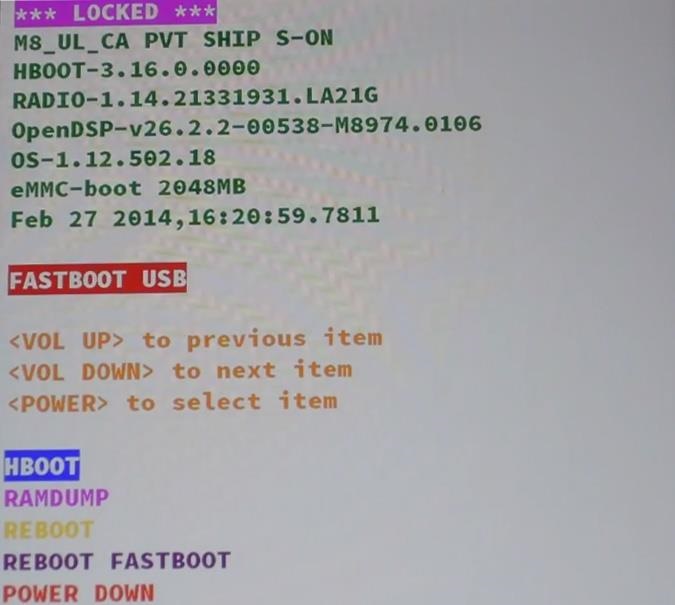
Once the screen above appears, open up a terminal (command prompt) on your computer. To get the right Unlock Code for your HTC One, you first need to get your device's specific Identifier Token, so type the following into your terminal window, followed by the Enter/Return key.
- fastboot oem get_identifier_token
Now copy the code you get, but do not include the first (bootloader) portions.

Go to HTCdev and log in to your account.
Select Unlock Bootloader and then Get Started.

From the drop-down menu, select HTC One (M8) (or just HTC One for the older M7 model, if that's what you're unlocking), then click on Begin Unlock Bootloader.
Agree to the terms and conditions and click Proceed to Unlock. On the next page, scroll all the way down and click on Proceed to Step 5.

Now paste the identifier token you copied in Step 3 into its corresponding box near the bottom (called My Device Identifier Token) and click Submit.

The Unlock Code will be emailed to you, so once you receive the email, download the attachment and place it on your Desktop.
Back in the terminal prompt, type the following.
- fastboot flash unlocktoken Desktop/Unlock_code.bin
Change Desktop/Unlock_code.bin to the location of your code.

Your phone will now prompt you to unlock your bootloader, so using theVolume Up button, select Yes and confirm your unlock with the Powerbutton.
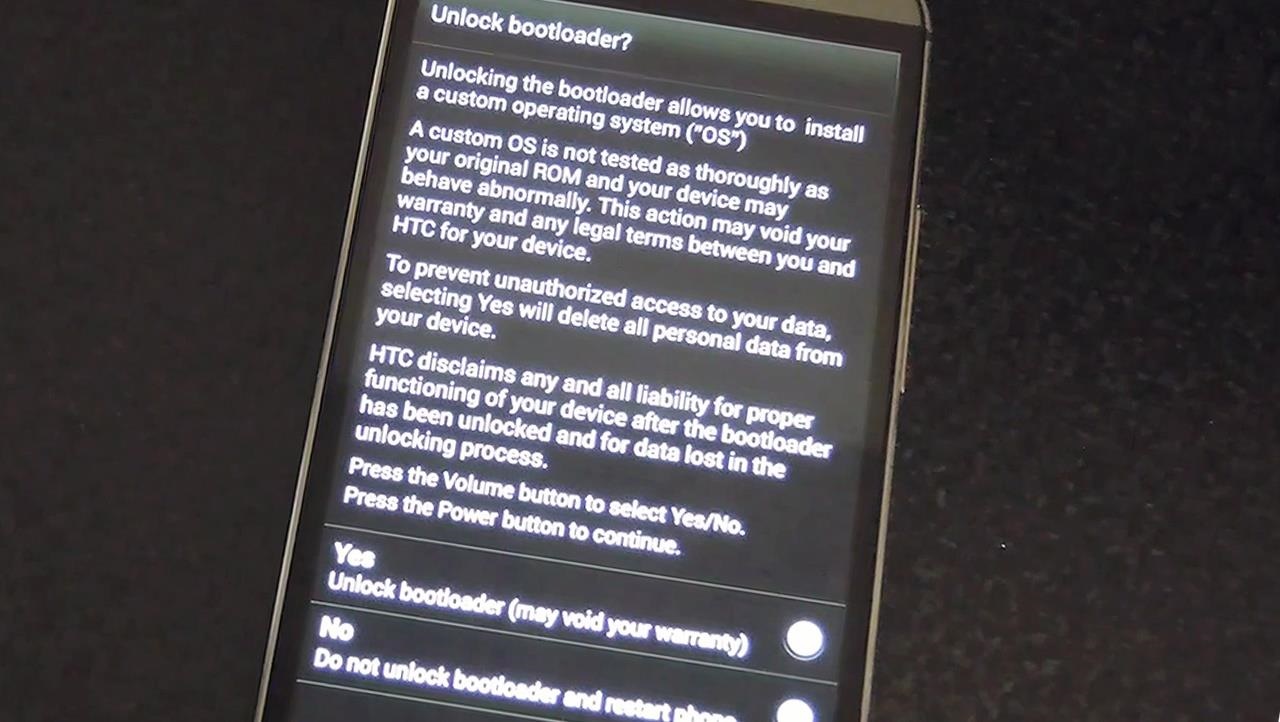
Your phone will now reboot and your bootloader will be unlocked!
After the reboot, you will need to set up your device again as if it were new. After getting set up, make sure to re-enable USB debugging and plug it back into your computer.
Now it's time to instill root privileges on our device, and to do that, we have to install both a custom recovery (in this case, TWRP) and SuperSU.
Just like we did back in Step 1, place your device into fastboot mode.
Now download the appropriate TWRP recovery file for your particular wireless carrier and edition below.
Now let's flash your downloaded TWRP file to your HTC One. Type one of the following commands into your terminal window, depending on which file you downloaded above.
For the AT&T, T-Mobile, Developer, or International editions, type:
- fastboot flash recovery Desktop/openrecovery-twrp-2.7.0.2-m8.img
For the Sprint edition, type:
- fastboot flash recovery Desktop/openrecovery-twrp-2.7.0.2-m8_whl.img
Once you get the Success message from ADB, type fastboot erase cache to prevent any boot loops.

Back on your HTC One, highlight Bootloader (using your Volume keys) and hit the Power button to confirm. In bootloader mode, select Recovery and hit the Power button again to boot into recovery mode. Your device will now reboot into TWRP.
Tap the Install option and select the SuperSU .zip you downloaded earlier, then swipe along the bottom bar to install.


After the install finishes, go ahead and hit Reboot System.
Congratulations, you have successfully Rooted Your HTC One M8
Any Queries and problems, Please leave a comment below. :)
Any Queries and problems, Please leave a comment below. :)

I am glad to be a visitor of this consummate web site! , appreciate it for this rare info ! . iphone photoshop
ReplyDeleteHi there! Do you use Twitter? I’d like to follow you if that would be ok. I’m undoubtedly enjoying your blog and look forward to new posts. device mockup
ReplyDeleteI enjoyed reading this a lot… I really hope to read more of your posts in the future, so I’ve bookmarked your blog. But I couldn’t just bookmark it, oh no.. When I see quality website’s like this one, I like to share it with others So I’ve created a backlink to your site (from … ipad template
ReplyDeleteYou can still think about a number of advised organized tours with various limo professional services. A handful of offer medieval software programs a number of will administer you really to get automobile for any capital center, or perhaps checking out the upstate New York. ??????? free phone mockup
ReplyDeleteThanks For sharing this Superb article.I use this Article to show my assignment in college.it is useful For me Great Work. https://tvbfdeals.com
ReplyDelete